Add Bin Location
Overview: Bin Location is a necessary first step for Cable Management. The Bin location is the location of the reel.
Process:
Add Bin Location
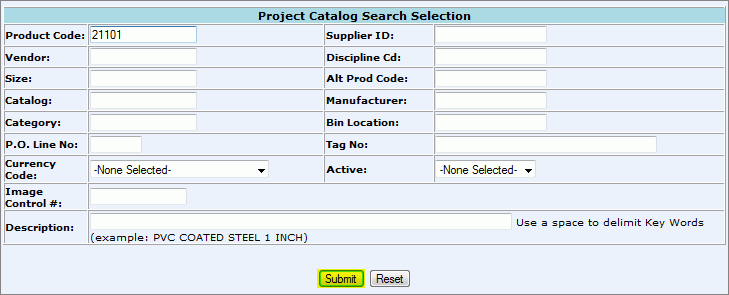
From the CMMS Menu > Admin > Project Catalog > Product Code Search.
Enter your search criteria:
Product Code: unique number that represents an inventory item.
Supplier ID: indicates supplier's identification
Vendor: Unique number that represents the company that sells material to the Electric Distributor for distribution.
Discipline Cd: Additional data required for the Project Catalog.
Size: The actual thread size of material (ex: 3/4 inch, enter 75) For cable, the AWG size is entered.
Alt Prod Code: alternative Product Code
Catalog: The part number used for identification of material by the manufacturer.
Manufacturer: Name of Manufacturer for product.
Category: Product category (ex: wire, lighting, etc.)
Bin Location: Physical location of product in warehouse
P.O. Line No: line number of product on Purchase Order.
Tag No: Customer defined label for a single product.
Currency Code: type of currency used (ex: USD, EUR)
Active: Designates if the Product Code is Active or Inactive (If blank, product code was imported).
Image Control #: Number assigned to productive image in Content Central.
Description: short description of item/product
Click Search and a list of search results will populate.
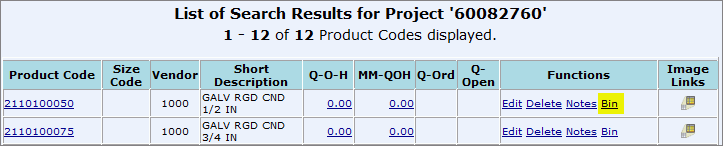
Click on the Bin hyperlink in the "Functions" column on the Search Results screen to add a Bin Location to the Product Code.
 Click Here to Learn How to Read
the Search Results
Click Here to Learn How to Read
the Search Results
Select the New Bin Location hyperlink to set up a new Bin.
(If Bin's have been set up they would list on this screen like the example below. To edit an existing Bin Location, click Edit in the Functions column.)

Populate the fields:
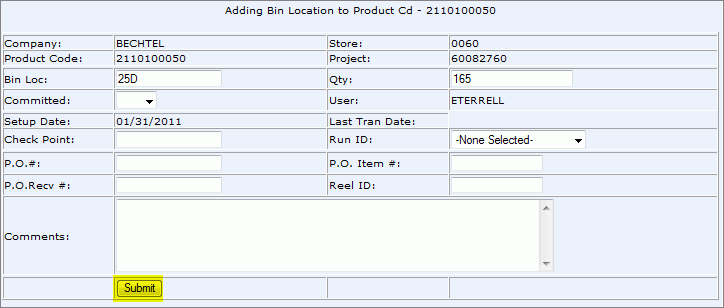
Bin Loc: physical location of Bin in warehouse
Qty: The quantity of items at Bin Location
Committed: Y/N. Used for specific purposes and manually committing a reel.
Check Point: the length agreed upon used for returns.
Run ID: code used to identify cable, cable tray, or conduit run
P.O.#: Purchase Order number that product was purchased on
P.O. Item #: line item number from Purchase Order
P.O. Recv #: The Receiver number that the Purchase Order was received on.
Reel ID: Usually the Bin Number or the name of the reel.
Comments: Any additional comments.
Click Submit.
To see updated Bin Location, search Product Code again.

View: Bin Location Report.
