Project Catalog Report
Overview: The Project Catalog Report generates multiple reports including the Project Catalog Report, Discrepancy Report, Bin Location Report.
Process:
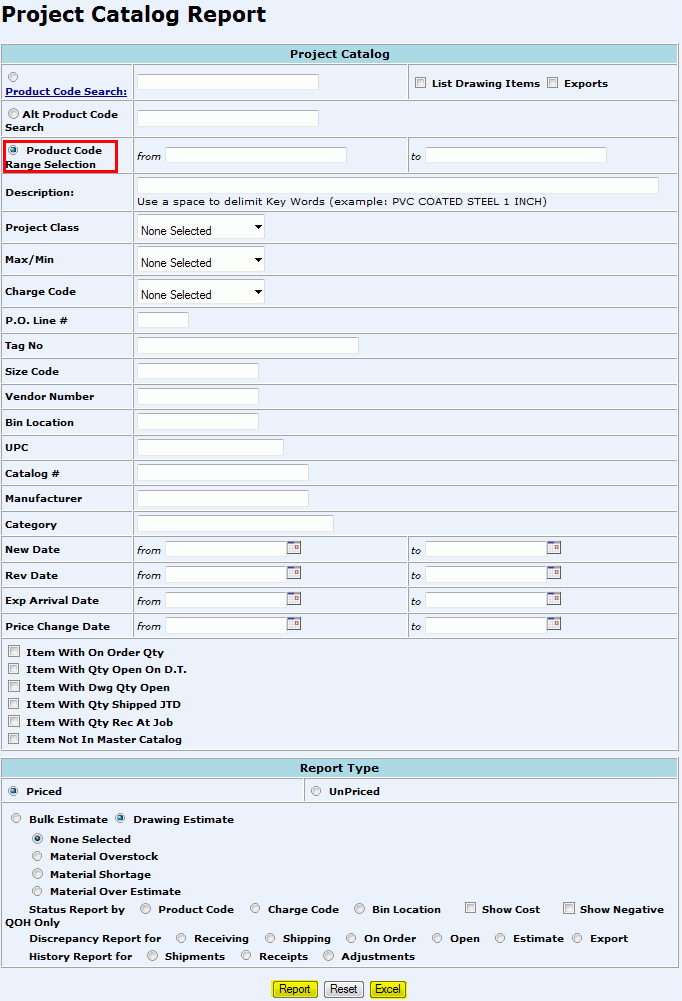
From the CMMS Menu > Reports > Project Catalog Report.
To download the entire catalog, click the Product Code Range Section radio button and leave the from and to fields blank.
OR
Enter specific report criteria:
Project Catalog:
Product Code Search: Allows users to search by only one product/item
List Drawing Items: Displays all drawings related to the item and how much material has been released against the item.
Exports: Displays all open and received export packages.
Alternate Product Code Search: Allows users to search by the customer created alternate product code.
Product Code Range Selection: Allows users to define the Product Code range to search by. (ex. 2110100075-2110100150)
Description: search by Product Code Description.
Project Class: Search by Class A, B, C, or D.
Max/Min: yes/no
Charge Code: If a charge code has been entered into the project, the user can select which to search by.
PO Line #: Allows user to search by the customer's line number if it was imputed into the project.
Tag No: Customer defined label for a product.
Size Code: The actual thread size of material. For Cable: enter the AWG size.
Vendor Number: Unique number that represents the company that sells material to the Electric Distributor for distribution.
Bin Location: Allows user to search
by the physical location of the product within the warehouse.
( Bin Location Report)
UPC: Allows user to search by the Universal Product Code.
Catalog #: Allows user to search by the part number used for the identification of material by the manufacturer.
Manufacturer: Allows user to search by the company that built/created the product.
Category: Product category (ex: wire, lighting, etc.)
New Date: Displays any new items added to catalog within a specific time frame.
Rev Date: Displays items where a revision occurred during the specific time frame.
Exp Arrival Date: Displays products that are expected to arrive at the job site between the from and to dates.
Price Change Date: Displays products that have had a price change between the from and to dates.
Item With On Order Qty: Displays products that are ordered.
Item with Qty Open on DT: Displays products that are currently on an open Delivery Ticket.
Item with Dwg Qty Open: Displays products that are currently in an open status on a Drawing.
Item with Qty Shipped JTD: Displays products that have shipped on the Job To Date.
Item with Qty Rec at Job: Displays products that have been received to the Job.
Item Not In Master Catalog: Displays any items that are not in the Master Catalog (Consolidated Projects).
Report Type:
Priced: Report will display price
Unpriced: Report will not display price.
Bulk Estimate: A summation of the total quantity of a specific commodity required for all Drawings.
Drawing Estimate: The total quantity of a specific commodity needed on a Drawing as identified during the material takeoff process.
None Selected
Material Overstock
Material Shortage
Material Over Estimate
Status Report by: Sorts report by product code, charge code, or bin location
Show cost: Displays cost.
Show Negative QOH: Displays the negative quantity on hand.
Discrepancy
for: Displays report
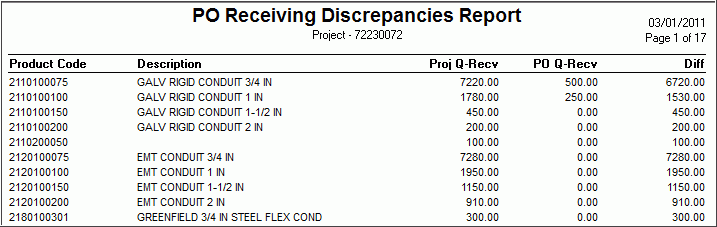
for receiving, shipping, on order, open, estimate, or export.
History Report for: shipments, receipts, or adjustments.
Click:
Report: Will generate an interactive graph of the Project Catalog Records. (See: Step 2)
Reset: Will reset the search criteria to the default.
Excel: Will display data in excel based from the Project Catalog Excel Layout Report
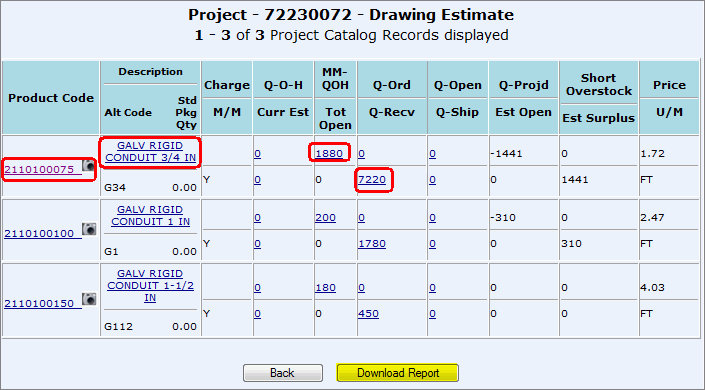
By clicking Report and interactive graph will display:
Click Here to Learn how to Read the Report
Any hyperlinks (outlined in red above) will give you more information about the content.
Click Download Report to view a text file with added information.
Click the here hyperlink to view the text report.


To save a the text file on your computer, right click on the here hyperlink.

Identify a save location.
*To import into Excel, open Excel and then open the text file into Excel.
By clicking the Excel button on the report screen, you will open some of the report data.
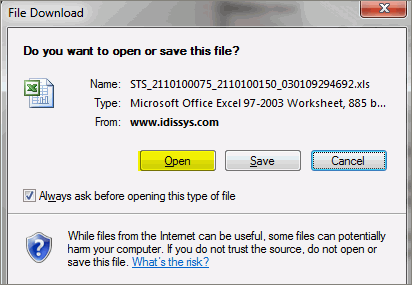
Click Open or Save.
View Excel spreadsheet.